
Create a homepage: The complete guide for 2026
Last updated: January 12, 2026
Imagine losing potential customers every day because your homepage looks outdated, doesn't work on a smartphone or simply doesn't exist. In 2026, a professional online presence will no longer be a luxury - it is essential for survival. If you have one Have a homepage created If you want to, you are faced with a huge choice: modular systems, freelancers, agencies or do-it-yourself solutions. This guide will show you which path is right for you and what you need to pay attention to.
Key takeaways
- Professional homepages will cost between 500 and 5,000+ euros in 2026, depending on scope, functions and provider
- AI-supported tools have become standard – all leading providers offer automated text creation and design optimization[1]
- IONOS MyWebsite Now Plus leads the test winner comparison 2026 with a grade of 1.6, followed by STRATO Plus (1.7) and Hostinger Plus (1.8)[1]
- Accessibility, GDPR compliance and performance are no longer optional features, but legal and practical necessities[3]
- The right provider depends on your goals: Construction kit for quick solutions, freelancers for individual projects, agencies for complex requirements
What does “have a homepage created” mean exactly?

Having a homepage created means that you outsource the development of your website to professionals or specialized service providers instead of building it yourself. You define your requirements, goals and budget - the service provider takes care of design, programming, content creation and technical implementation.
Three main paths are available to you in 2026:
- Homepage builders with service: Providers like IONOS, STRATO or Hostinger not only offer DIY tools, but also professional creation services starting at €1 per month[1]
- Freelancers and sole proprietors: Individual solutions at medium prices, usually 1,500-3,500 euros for small to medium-sized projects
- Web design agencies: Comprehensive support from strategy to launch, typically 3,000-15,000+ euros for complex websites
The market has expanded significantly in 2026. The current modular comparison now includes 13 tested providers (up from 7 last year), with new entrants like Hostinger, GoDaddy and World4You[1]. This expansion shows that the demand for professional homepage solutions is continuously growing.
Important to understand: “Having a homepage created” does not automatically mean “expensive”. The price range extends from inexpensive modular services to premium agency services. What's important is that you retain control over strategy and content while experts take care of the technical implementation.
Why should you have a homepage created instead of building it yourself?
Time, expertise and quality of results are the three main reasons why more and more entrepreneurs have their homepage created instead of developing it themselves.
Time savings are measurable
Creating a professional homepage yourself will cost you 40-80 hours - and that's only if you already have basic knowledge. You can invest this time in your core business. A freelancer or agency will deliver you a finished product in 2-4 weeks while you focus on customer acquisition, product development or services.
Technical expertise makes the difference
In 2026, the requirements for websites will have become significantly more complex:
- Performance optimization: Loading times under 2 seconds are standard[9]
- Mobile-first design: Over 70% of users access websites on mobile
- GDPR compliance: Cookie banners, data protection declarations and legally compliant forms are mandatory
- Accessibility: Websites must be usable for people with disabilities[3]
- SEO basics: Without search engine optimization, no one will find you
Implementing these requirements professionally requires specialized knowledge. An experienced web designer knows the current standards and implements them directly - you don't have to fight your way through hundreds of tutorials.
Professional design impresses customers
First impressions count. Studies show that users make a judgment about your website within 0.05 seconds. A self-made template design often appears generic and interchangeable. Professional designers create custom layouts that authentically represent your brand and build trust.
Long-term maintenance and updates
Websites need regular updates – security patches, plugin updates, content adjustments. If you have your Have a professional homepage created Many providers also take care of ongoing maintenance. This protects you from security gaps and outdated technologies.
When is DIY still worthwhile? If you have a very small budget (under 0), have time to learn, and only need a simple business card website, modular systems may be an option. For all other cases, professional support is the better investment.
How much does it cost to have a homepage created?
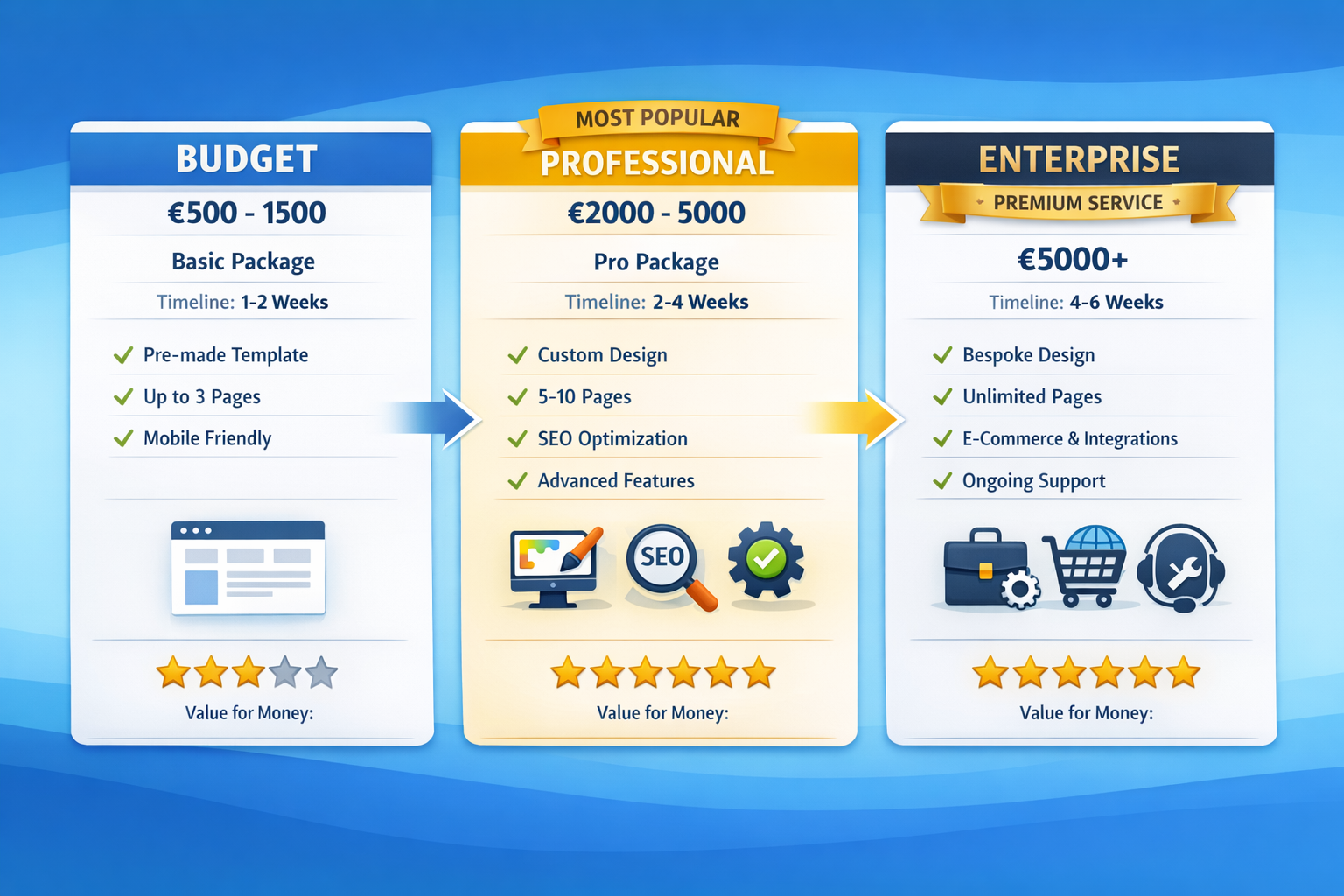
The costs for a professional homepage in 2026 will be between 500 and 15,000+ euros, depending on complexity, range of functions and chosen service provider. This wide range is explained by different service levels and requirements.
Price overview by provider type
| Provider type | Price range | Typical services | Suitable for |
|---|---|---|---|
| Modular service | 1-50 €/month + one-off 0-500 € | Template-based, AI support, basic SEO | Small businesses, self-employed people, simple websites |
| Freelancer | 1,500-5,000 € | Custom design, WordPress setup, content integration | Medium-sized companies, specific requirements |
| Web design agency | 3,000-15,000+ € | Full service, strategy, custom development, ongoing support | Larger companies, complex projects, e-commerce |
| Specialized developers | 5,000-50,000+ € | Tailor-made solutions, own programming, interfaces | Enterprise solutions, special functionalities |
Modular provider in detail
IONOS MyWebsite Now Plus leads the test winner comparison in 2026 with a grade of 1.6 and offers the Starting price from €1 per month[1]. This makes professional homepages accessible even for the smallest budgets. STRATO Plus follows with a grade of 1.7 and Hostinger Plus with 1.8[1].
These providers particularly score points for:
- AI-powered website creation: Automatic text creation, design suggestions and SEO optimization[1]
- 24/7 German-speaking support: IONOS impresses with consistent support in German[1]
- German server locations: Important for GDPR compliance and data protection[1]
- Integrated marketing tools: Email marketing, social media integration, analytics
Additional cost factors
In addition to the basic price, you should plan for:
- Domain registration: 10-20 € annually
- Premium plugins: 50-300 € one-time or annually
- Professional photos: €200-1,000 (stock photos or photo shoot)
- Copywriting: €100-500 per page for professional copywriters
- SEO optimization: €500-2,000 one-off for basic setup
- Ongoing maintenance: 50-200 € per month
Avoid hidden costs
Watch out for these common cost traps:
- Providers who entice with low prices but then increase them drastically after a year
- Additional costs for basic features such as SSL certificates or backup functions
- Expensive change requests after project completion (clarify beforehand how many correction loops are included)
- Vendor lock-in: Some modular systems make a later move almost impossible
Rule of thumb for 2026: Plan 20-30% more budget than the pure creation costs. This gives you scope for unforeseen adjustments and professional content creation.
How does the process work when you have a homepage created?
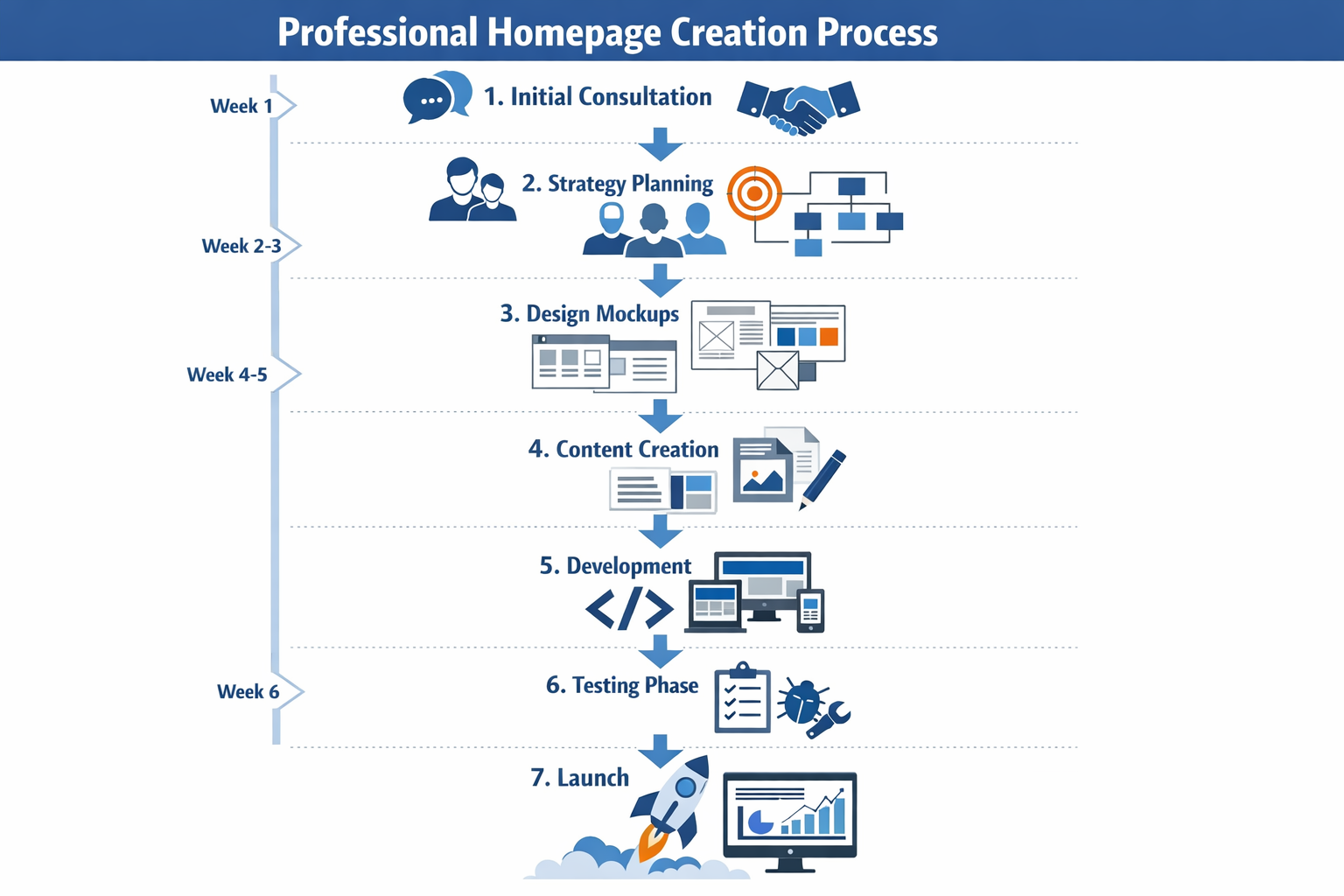
The typical process takes 2-8 weeks and goes through seven clearly defined phases - from the first consultation to the launch. The exact duration depends on the project complexity and your reaction speed.
Phase 1: Initial consultation and briefing (week 1)
In a detailed conversation, you will clarify your goals, target group and requirements with the service provider. Important questions in this phase:
- What are your main goals with the website? (customer acquisition, information, online sales)
- Who is your target group and how do they behave online?
- Which functions do you absolutely need? (contact form, booking system, shop)
- Are there corporate design specifications or existing brand guidelines?
- Which websites do you like and why?
Professional providers create a detailed offer from this with scope of services, timeline and fixed price. At a Have your website professionally created This step should be free.
Phase 2: Conception and sitemap (week 1-2)
The service provider develops the information architecture of your website. This includes:
- Sitemap: What pages and subpages are there?
- User journey: How do visitors navigate through the website?
- Content strategy: What content is placed where?
- Functional requirements: Technical specification of all features
You will receive a concept document for approval. Important: Changes are easy and cheap to implement in this phase - later on it becomes more expensive.
Phase 3: Design and Wireframes (Week 2-3)
Now it becomes visual. The designer creates:
- Wireframes: Schematic representation of the layout without final colors/images
- Mockups: Detailed design drafts for 2-3 key pages
- Responsive views: How does the website look on desktop, tablet and smartphone?
These design trends will be standard in 2026:
- Content-first layouts: Structure follows content, not the other way around[3]
- Dark mode option: More and more websites offer light/dark mode[5][6]
- Big, eye-catching typography: Font as an active design element[6]
- Minimalism: Less visual complexity, more clarity[3]
You give feedback and the designer adjusts the design (typically 2-3 correction loops).
Phase 4: Content creation (weeks 2-4, parallel)
While the design is being created, the content is being developed:
- Texts: Either you deliver it yourself or hire professional copywriters
- Pictures: Professional photos, stock footage or illustrations
- videos: If desired, product videos or explanatory content
- SEO optimization: Keywords, meta descriptions, alt texts
AI support will be standard in 2026: All leading providers offer automated text creation and optimization[1]. This speeds up the process significantly, but should always be checked manually.
Phase 5: Technical Development (Week 3-5)
After design approval, programming begins:
- CMS setup: Mostly WordPress, sometimes proprietary systems
- Template customization: The design is translated into working code
- Plugin integration: Contact forms, SEO tools, analytics, cookie banners
- Responsive optimization: Perfect display on all devices
- Performance tuning: loading time optimization, image compression[9]
At a Have a WordPress website created This step is particularly efficient because WordPress offers a mature ecosystem.
Phase 6: Testing and Quality Assurance (Week 5-6)
Before launching, the website is thoroughly tested:
- Functionality: All links, forms, buttons work
- Browser compatibility: Chrome, Firefox, Safari, Edge
- Mobile responsiveness: Perfect display on different screen sizes
- performance: Loading times under 2 seconds[9]
- SEO check: Technical optimization, meta tags, sitemap
- GDPR compliance: Legally compliant data protection declaration, cookie banner
You will receive access to a test environment and you can check for yourself. Now is the last time to request changes.
Phase 7: Launch and handover (weeks 6-8)
After final approval, the website goes live:
- Domain linking: Your domain points to the new website
- SSL certificate: HTTPS encryption is activated
- Analytics setup: Google Analytics or alternative tools are set up
- training: You will learn how to update content yourself
- documentation: Access data, instructions, maintenance instructions
Professional providers offer ongoing support. At Create and maintain website Updates, backups and support are included.
Avoid frequent delays
These factors extend projects:
- Delayed delivery of content (text, images) from your side
- Unclear requirements at the start of the project
- Too many correction loops due to a lack of willingness to make decisions
- Technical issues with third-party integrations
Tip: Start by defining clear deadlines for your own deliveries and stick to them. This speeds up the entire process significantly.
What functions should your homepage have in 2026?
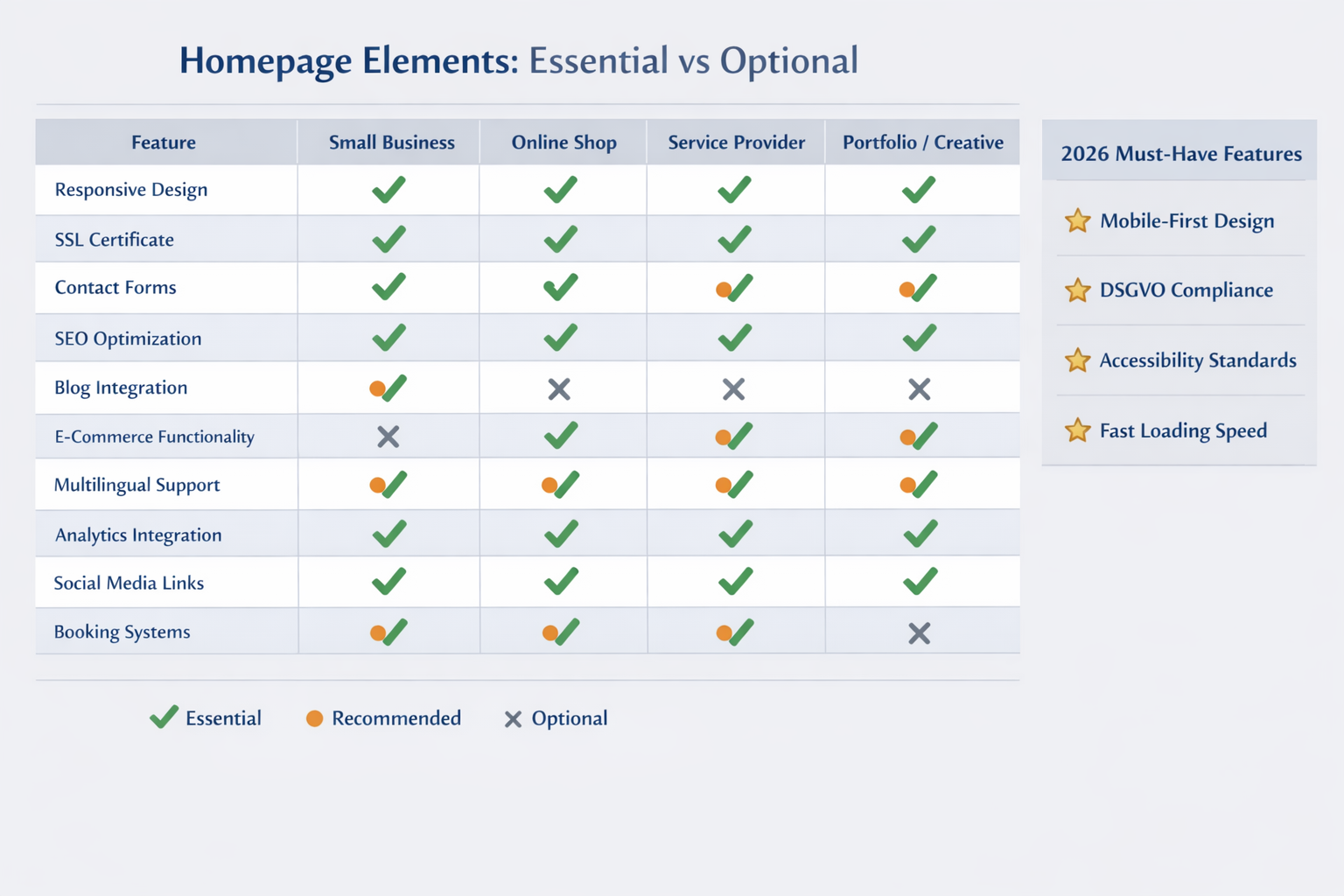
In 2026, a modern homepage needs much more than just a pretty look. Performance, accessibility and legal compliance are no longer optional features, but basic requirements[3]. The following features differentiate professional from amateur websites.
Mandatory features for every homepage
These elements are non-negotiable in 2026:
- Mobile-first design: Perfect display on all screen sizes, touch-optimized navigation
- SSL encryption (HTTPS): Security standard and Google ranking factor
- GDPR-compliant data protection declaration: Formulated in a legally secure manner, up to date
- Cookie banner: Legally compliant consent for tracking and analytics
- imprint: Complete provider identification according to German law
- Contact option: At least form or email address
- Loading time under 2 seconds: Performance optimization is standard[9]
If you have your Make your website GDPR compliant If you want to, you should consider these points from the start.
Accessibility as standard
In 2026, barrier-free websites will be mandatory for many companies and best practice for everyone else[3]. That means:
- Keyboard navigation: All functions can be operated without a mouse
- Screen reader compatibility: Alternative texts for images, semantic HTML
- Sufficient contrasts: Text must be easy to read
- Enlargeable fonts: Without layout breaks
- Clear structure: Logical heading hierarchy
One Accessible website reaches more users and improves your SEO performance at the same time.
Performance features
Speed will be a decisive competitive advantage in 2026:
- Image optimization: WebP format, lazy loading, responsive images
- caching: Browser and server caching for returning visitors
- Minified code: Compressed CSS and JavaScript
- CDN usage: Content Delivery Networks for Global Speed
- Efficient hosting: Modern server technology such as LiteSpeed
These optimizations not only reduce loading times, but also CO₂ emissions – Sustainable web design becomes a competitive factor[3][6].
SEO basic equipment
Without search engine optimization no one will find you:
- Clean URL structure: Speaking URLs with keywords
- Meta titles and descriptions: Optimized for every page
- Heading hierarchy: H1, H2, H3 logically structured
- XML sitemap: For Google and other search engines
- Schema markup: Structured data for rich snippets
- Internal linking: Logical linking of your content
One Local SEO agency can help you be found better locally.
Advanced features as needed
Depending on your business model, these features may make sense:
For service providers:
- Online appointment booking
- Customer portal with login
- Price calculator or configurator
- References and testimonials
- FAQ section
For online shops:
- Product catalog with filter functions
- Shopping cart and checkout
- Payment integration (PayPal, credit card, Klarna)
- Shipping cost calculation
- Customer account management
If you have one Have an online shop created If you want to, these features are essential.
For content websites:
- Blog with categories and tags
- Newsletter registration
- Social media integration
- Comment function
- Search function
AI-powered personalization
In 2026, AI support will become standard: Websites automatically adapt to the user - different content for new versus existing customers based on search queries and behavior[2][4][5]. This significantly increases conversion rates.
Practical AI features:
- Personalized product recommendations
- Dynamic content adjustment based on user behavior
- Chatbots for customer service
- Automatic image optimization
- AI-generated meta descriptions
Analytics and tracking
You need to know how your website is performing:
- Google Analytics or privacy-friendly alternatives (Matomo, Plausible)
- Conversion tracking: What actions do users take?
- Heatmaps: Where do users click, how do they scroll?
- A/B testing: Which version works better?
Important: All tracking tools must be integrated in a GDPR-compliant manner with the appropriate user consent.
Have a homepage created: modular system vs. agency vs. freelancer
Choosing the right service provider determines success, costs and satisfaction. Each option has specific advantages and disadvantages - the best choice depends on your needs, budget and time frame.
Website builder with service
Best choice for: Small businesses, self-employed people, simple websites on a limited budget
Advantages:
- Extremely cheap: From €1 per month at IONOS[1]
- Quick start: Website can go live in a few days
- AI support: Automated copywriting and design suggestions[1]
- All-in-one solution: Hosting, domain, support from a single source
- No technical knowledge required: Intuitive operation
- German-speaking support: 24/7 with premium providers such as IONOS[1]
Disadvantages:
- Limited individuality: Template based, design boundaries
- Vendor lock-in: Moving to another provider is often difficult
- Functional limitations: Complex features not always possible
- Scaling limits: Problematic when traffic is growing rapidly
Top providers 2026:
- IONOS MyWebsite Now Plus (grade 1.6)[1]
- STRATO Plus (grade 1.7)[1]
- Hostinger Plus (grade 1.8)[1]
Choose a modular system if: You need a maximum of 10 pages, have a tight budget (under €1,000) and want to get online quickly.
Freelancers and sole proprietors
Best choice for: Medium-sized projects with individual requirements, personal support desired
Advantages:
- Individual solutions: Tailored design and features
- Personal contact: Direct line to the developer
- flexibility: Adjustments possible during the project
- Medium price level: €1,500-5,000 typical
- specialization: Many freelancers have niche expertise
Disadvantages:
- Capacity limits: The project comes to a standstill in the event of illness or vacation
- Dependency: Long-term maintenance depends on one person
- Quality fluctuations: Big differences between freelancers
- No all-round support: Often just design OR development, not both
Where can you find freelancers:
- Specialized platforms (Fiverr, Upwork, 99designs)
- Local networks and recommendations
- LinkedIn and XING
- Freelancer directories
Choose freelancers if: You need 10-30 pages, have individual design requirements and have a budget of €2,000-5,000.
Web design agency
Best choice for: Complex projects, larger companies, full service desired
Advantages:
- Complete team: designers, developers, copywriters, SEO experts
- Strategic advice: Not just implementation, but conception
- reliability: Multiple contacts, no risk of failure
- Long-term care: Maintenance, updates, optimization
- Professional processes: Structured project management
- Comprehensive services: From branding to marketing
Disadvantages:
- Higher costs: €3,000-15,000+ depending on the scope
- Longer project duration: 6-12 weeks typical
- Less direct: Communication via project managers
- Possibly overhead: Pay for structure, not just work
Choose an agency if: You need over 30 pages, e-commerce functions or complex integrations, have a budget of €5,000 or more and want strategic advice.
Comparison table
| criterion | Construction kit | Freelancer | agency |
|---|---|---|---|
| Cost | 1-50 €/month | 1,500-5,000 € | 3,000-15,000+ € |
| Project duration | 1-7 days | 2-6 weeks | 6-12 weeks |
| individuality | ⭐⭐ | ⭐⭐⭐⭐ | ⭐⭐⭐⭐⭐ |
| Support | ⭐⭐⭐⭐ | ⭐⭐⭐ | ⭐⭐⭐⭐⭐ |
| Scalability | ⭐⭐ | ⭐⭐⭐ | ⭐⭐⭐⭐⭐ |
| Technical complexity | Simply | Medium-High | Very high |
Hybrid solutions
In 2026, many providers will offer mixed forms:
- Construction kit + agency service: IONOS and others offer professional setup services in addition to the kit
- WordPress + Freelance: Freelancers use WordPress as a basis, but customize it individually
- Agency + modular maintenance: Agency created, you maintain it yourself later
These hybrids often combine the best of several worlds: professional creation at a moderate cost with long-term independence.
Avoid common mistakes when creating a homepage
Even if you hire professionals, projects can fail – often due to avoidable errors on the part of the client. You should know and avoid these seven stumbling blocks.
Mistake 1: Unclear objective
The problem: You commission a homepage without specific goals. “I just need a website” is not a sufficient basis.
The consequences: The service provider develops a generic solution that looks nice but doesn't support your business goals. Conversion rates remain low, ROI cannot be measured.
How to avoid it: Before starting the project, clearly define:
- What does the website want to achieve? (Generate leads, sell products, inform)
- Who is the target group? (age, interests, behavior)
- What actions should users take? (Call, buy, subscribe to newsletter)
- How do you measure success? (Concrete KPIs)
Mistake 2: Cheapest provider without quality control
The problem: You choose the cheapest provider without checking references, portfolio or reviews.
The consequences: Poor code quality, outdated technologies, poor support. The website looks unprofessional, is slow and unmaintainable. In the end, improvements cost more than what a reputable provider would do from the start.
How to avoid it:
- Request portfolio and references
- Read reviews on independent platforms
- Conduct preliminary discussions with several providers
- Check technical competence (ask about technologies used)
- Don’t just compare prices, but also the scope of services
Rule of thumb: If an offer is 50% below the market average, caution is advised.
Mistake 3: No content preparation
The problem: You think the service provider creates all the content automatically. However, texts, images and videos are often not included in the basic price.
The consequences: Project delays of weeks or months. Additional costs for content creation. Or worse: the website goes live with placeholder texts.
How to avoid it:
- Clarify in the offer who is providing content
- Prepare texts, images and videos before the start of the project
- Hire professional copywriters and photographers in good time
- Use AI tools for initial drafts, but revise manually[1]
- Plan 2-4 weeks for content creation
Error 4: Missing maintenance agreement
The problem: The website goes live, but no one takes care of updates, backups and security.
The consequences: Security gaps are not closed. The website is hacked or goes down. Outdated plugins lead to compatibility issues. In an emergency, no one is available.
How to avoid it:
- Agree on maintenance contracts right from the start
- Clarify who performs updates (you or service provider)
- Make sure automatic backups are running
- Define support times and response times
- Document access data and technical details
At Create and maintain website These services are often already included.
Mistake 5: Not checking mobile optimization
The problem: You only check the website on a desktop computer, even though over 70% of users access it on mobile.
The consequences: Bad user experience on smartphones. High bounce rates. Loss of customers and lower Google rankings.
How to avoid it:
- Test the website on real mobile devices (not just the browser simulator)
- Check different screen sizes (smartphone, tablet)
- Look for touch-optimized buttons and navigation
- Test loading times on the mobile network
- Use Google’s Mobile-Friendly Test
Mistake 6: Treating SEO as an afterthought
The problem: You think SEO can be done later. The website is built without SEO fundamentals.
The consequences: Subsequent SEO optimization is complex and expensive. The website does not rank in search engines. Organic traffic is missing.
How to avoid it:
- Integrate SEO into your planning right from the start
- Conduct keyword research before creating content
- Make sure technical SEO (URLs, meta tags, sitemap) is implemented
- Plan content strategy with SEO focus
- Hire SEO experts alongside development
A professional CHECK 360° website uncovers SEO vulnerabilities.
Mistake 7: Not planning training
The problem: The website is handed over, but you don't know how to update content yourself.
The consequences: For any small changes you must contact the service provider. That costs time and money. The website remains static and outdated.
How to avoid it:
- Arrange training dates in the project plan
- Request written documentation
- Learn the most important functions of the CMS
- Test changes yourself in a test environment
- Clarify which changes you can make yourself and which should be done by professionals
Bonus tip: Many agencies offer video tutorials specifically for your website - this is often more helpful than generic WordPress instructions.
FAQ: The most important questions about having your homepage created
How long does it take to have a homepage created?
2-8 weeks are typical, depending on complexity and provider. Modular services can go live in 1-3 days, freelancers need 2-4 weeks, agencies 6-12 weeks. Your own reaction speed (feedback, content delivery) influences the duration significantly.
How much does a professional homepage cost in 2026?
500-15,000+ euros depending on the scope. Modular services start from €1 per month[1], freelancers charge €1,500-5,000, agencies €3,000-15,000+. In addition, there are ongoing costs for hosting (5-50 €/month) and maintenance (50-200 €/month).
Do I need technical knowledge when I create a homepage?
No, that's exactly the advantage. Professional service providers take care of all technical aspects. However, you should have basic digital skills in order to update content yourself later. Most providers offer training.
Can I update my homepage myself later?
Yes, with most modern solutions. WordPress and website builders offer intuitive editing interfaces. You can change text, images and simple layouts yourself. For more complex customizations (design, functions) you still need professionals.
What documents do I need to create a homepage?
You should prepare these materials: Logo and branding guidelines, texts for all pages, professional photos, contact details and imprint, data protection declaration, information about the target group and goals. The better your preparation, the faster and cheaper the project.
Is WordPress or a builder better?
Depends on your requirements. WordPress offers more flexibility and scalability, but requires more maintenance. Building kits are easier to use and require less maintenance, but their functionality is more limited. For small companies, building blocks are often sufficient; for growing companies, WordPress is the better choice.
How do I find the right provider?
Check portfolio, references and reviews. Conduct preliminary discussions with 3-5 providers. Pay attention to communication, understanding of your goals and technical competence. Compare offers not just by price, but by scope of services. Ask about maintenance and support options.
What is the difference between homepage and website?
Homepage is technically just the homepage, but is often used colloquially as a synonym for the entire website. A website is the entirety of all pages under a domain. The difference makes no practical difference when it comes to commissioning.
Does my homepage have to be GDPR compliant?
Yes, absolutely. Any website that processes personal data (even just IP addresses) must be GDPR compliant. This includes: data protection declaration, cookie banner with consent, secure data transmission (SSL), order processing contracts with service providers. Violations can be costly.
Can I have my old homepage moved?
Yes, that is possible. Professional providers offer website migration. Content, design and functions are transferred to a new system. The costs are typically €500-2,000, depending on complexity. Make sure URLs are redirected to get SEO rankings.
Do I need an online shop or is a simple homepage enough?
That depends on your business model. If you want to sell products directly, you need a shop. For services, information or lead generation, a classic homepage with a contact form is often sufficient. A Have an online shop created is significantly more complex and expensive than an information website.
How important is loading speed?
Extremely important. Websites should load under 2 seconds in 2026[9]. Slower pages lose visitors and rank lower on Google. Performance optimization (image compression, caching, efficient hosting) is a must, not a nice-to-have.
Key takeaways
- The market for homepage creation has expanded significantly in 2026 – 13 tested modular providers offer solutions from €1 per month[1]
- IONOS MyWebsite Now Plus leads the test winner comparison with a grade of 1.6, followed by STRATO Plus (1.7) and Hostinger Plus (1.8)[1]
- AI support has become standard – automated copy creation, design suggestions and SEO optimization are available from all leading providers[1]
- The costs vary greatly: Modular services from €1/month, freelancers €1,500-5,000, agencies €3,000-15,000+
- Accessibility, GDPR compliance and performance are mandatory, not optional[3]
- The typical creation process takes 2-8 weeks and includes seven phases from consultation to launch
- Choose the provider according to your requirements: Construction kit for simple projects, freelancers for individual solutions, agencies for complex requirements
- The most common mistakes are avoidable: Plan clear objectives, content preparation and maintenance agreements from the start
- Mobile-first design will be standard in 2026 – over 70% of users access websites on mobile
- Plan for long-term care: Websites need regular updates, backups and security patches
Conclusion: your next steps
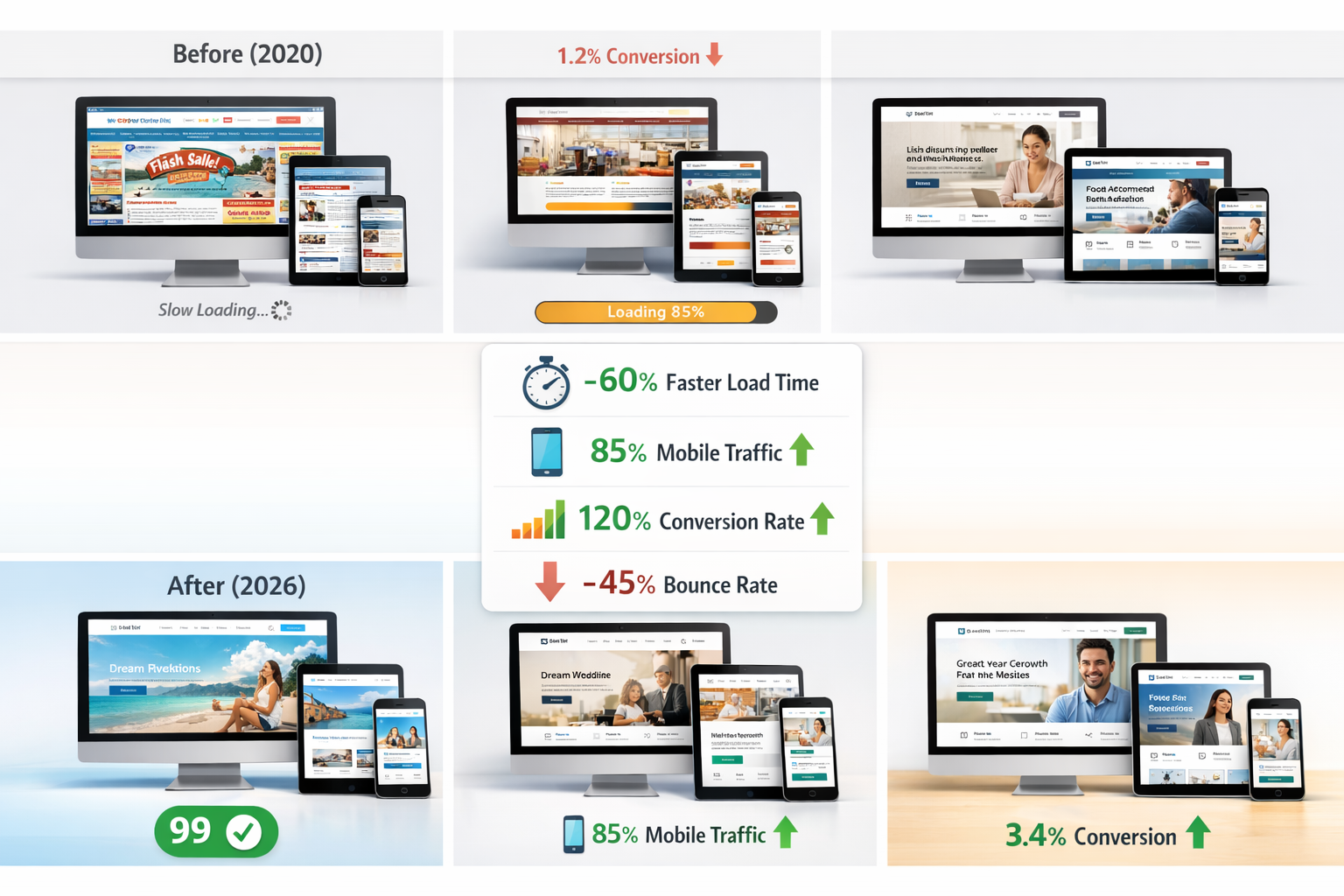
In 2026, having a professional website created is more accessible, cheaper and more efficient than ever before. The combination of AI-supported tools, sophisticated modular systems and professional service providers offers the right solution for every budget and every requirement.
Start now with these concrete steps:
Define your goals and requirements – What should your homepage achieve? Who is your target group? Which functions do you absolutely need?
Set your budget – Realistic assessment including ongoing costs for hosting and maintenance
Compare providers – Get 3-5 offers from modular services, freelancers or agencies, depending on your requirements
Check references and portfolio – Look at previous work and read reviews
Prepare content – Collect texts, images, logo and all relevant information
Start the project – With clear agreements on the scope of services, timeline and maintenance
For small businesses and self-employed people with a limited budget Modular services such as IONOS MyWebsite Now Plus (from €1 per month[1]) are the ideal way to get started. You get professional results with AI support, without any technical knowledge.
For medium-sized projects with individual requirements Freelancers offer the best value for money. You receive tailor-made solutions at moderate costs.
For complex projects and larger companies specialized agencies are the right choice. Full service from strategy to ongoing optimization justifies the higher investments.
Important: Your homepage is not a one-off project, but a living marketing tool. Plan for ongoing optimization, content updates, and technical maintenance right from the start. The digital world is evolving quickly - your website should keep up.
Ready to start? Use the information in this guide to make an informed decision. A professional homepage in 2026 is not a question of “if”, but rather “how” – and now you know how to do it.
References
[1] Homepage construction kit comparison – https://www.fuer-gruender.de/wissen/unternehmen-gruenden/website-erstellen/homepage-Construction kit-vergleich/
[2] Web Design Seo Trends 2026 Strategy – https://cbachleitner.de/blog/webdesign-seo-trends-2026-strategie/
[3] Web design 2026 The design trends – https://www.formwandler-interactive.com/blog/webdesign-2026-die-designtrends/
[4] Web design trends – https://www.vistaprint.de/hub/webdesign-trends
[5] Web design 2026 What we learned in 2025 and which trends determine modern websites – https://www.organica.agency/de/magazin/webdesign-2026-was-wir-2025-gelernt-haben-und-welche-trends-moderne-webseiten-determinen/
[6] Web design trends – https://www.studio-craft.at/ratgeber/webdesign-trends/
[9] Tips for website performance optimization These are the trends – https://www.ionos.de/digitalguide/websites/web-entwicklung/tipps-zur-website-performance-optimization-das-sind-die-trends/
KI-Offenlegung: HINWEIS: Pictures wurden mit KI erstellt oder bearbeitet und sind keine realen Abbildungen. Teile der Texte wurden mit Hilfe von KI erstellt und redaktionell von einem Mensch bearbeitet.