
Have a website created: The complete guide for 2026

Last updated: January 6, 2026
Do you need a professional website but don't have the time or desire to mess around with it yourself? One Have a website created is often the smartest decision - especially if you want your business to grow and you don't want to struggle with templates for months. The good news: The market for professional website creation has evolved significantly in 2026, and the options are more diverse than ever.
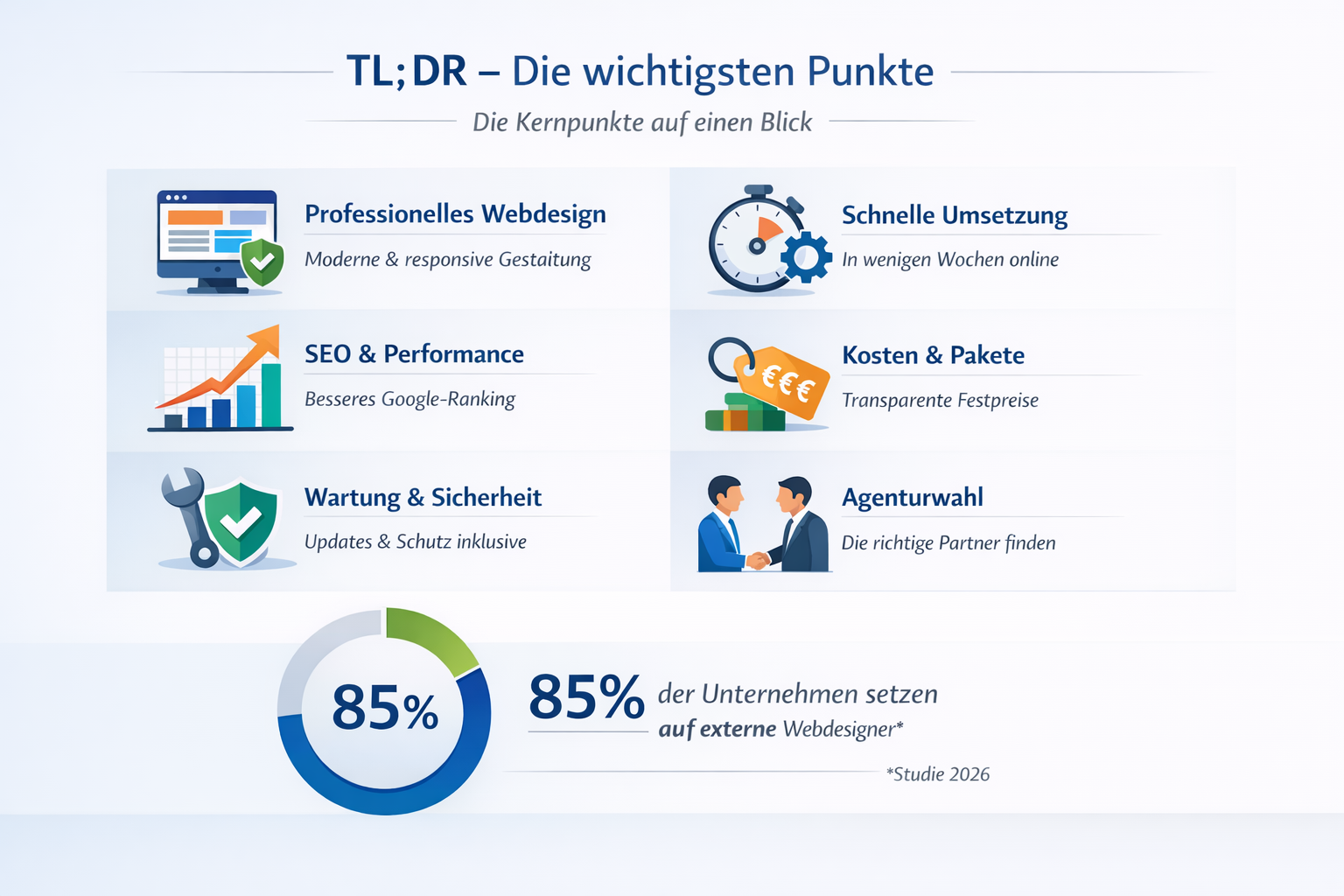
TL;DR – Key points
- Have a website created costs between 1,500 and 15,000 euros, depending on the scope and functions
- Professional agencies deliver a finished, SEO-optimized website in 4-8 weeks
- Modern websites are more than digital business cards – they integrate booking systems, automation and CRM tools
- The choice between freelancer, agency or platform depends on budget, time frame and complexity
- GDPR compliance, accessibility and mobile optimization will no longer be extras in 2026, but rather mandatory
Quick Answer: What does “Have a website created” mean?
Having a website created means that professionals – whether freelancers, agencies or specialized service providers – conceive, design, program and put your entire website online. You provide the content and requests, they take care of design, technology, SEO and often hosting. The process typically takes 4-8 weeks and costs between 1,500 euros for simple pages to over 15,000 euros for complex business websites with special functions.
Why should you have a website created instead of building it yourself?
The simple answer: Time, quality and results. While DIY kits seem temptingly cheap, building them yourself often takes months of frustrating work - and the result still looks like a template.
The concrete advantages of professional website creation
Time savings that pay off
An experienced web designer needs 4-6 weeks to create a professional business website. Yourself? Expect 3-6 months of evening work if you also run a business. The opportunity cost is enormous.
Technical excellence without the headaches
Professionals are familiar with:
- Performance optimization – Loading times under 2 seconds
- SEO basics – correct structure right from the start
- Security – SSL, backups, updates
- GDPR compliance – Cookie banner, data protection, legal notice
- Accessibility – Meet legal requirements
Individual design instead of a template look
Your competition uses the same building blocks. One Have a professional homepage created means: unique design that reflects your brand and turns visitors into customers.
When is it still worth building it yourself?
Choose DIY building sets if:
- You just one temporary landing page needed for an event
- Your budget is and must remain under 500 euros
- You technically savvy and enjoy crafting
- The website is not a business-critical element
Have it done professionally if:
- Your website Generate sales should
- You in Search engines found want to become
- Time is more important than money is
- You special functions need (bookings, shop, member areas)
How much does it cost to have a website created?
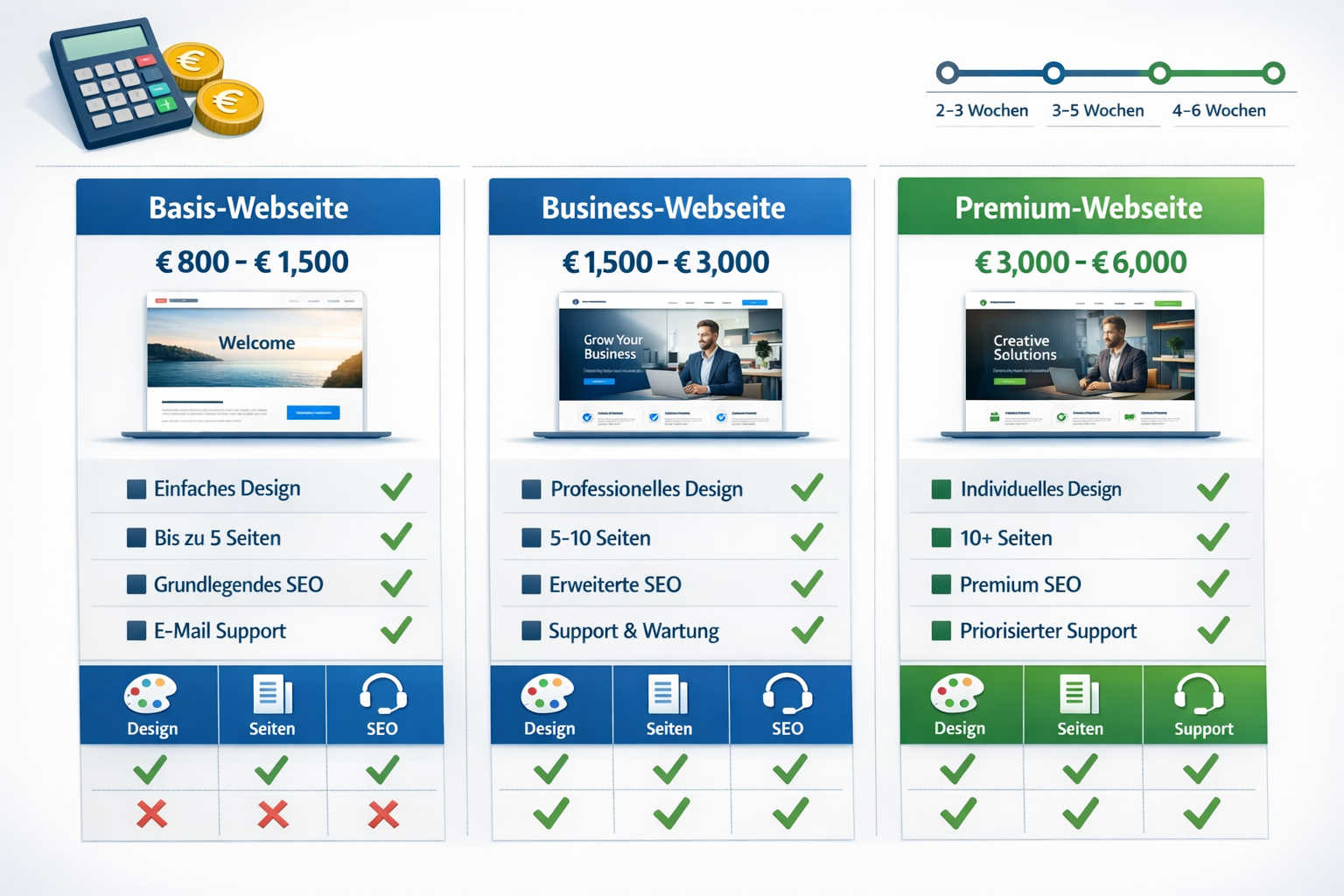
The price range is from 1,500 to 15,000+ euros – but these numbers alone won’t help you. The costs depend on the scope, functions and your goals[1]. A simple one-pager website costs significantly less than a portal with a booking system, chatbot and CRM integration[1].
Detailed cost overview 2026
| Website type | Price range | Typical features | Time frame |
|---|---|---|---|
| Basic website | 1,500 – 3,500 € | 5-8 pages, responsive design, contact form, basic SEO | 2-4 weeks |
| Business website | 3,500 – 8,000 € | 10-20 pages, custom design, advanced SEO, blog, newsletter integration | 4-8 weeks |
| Premium website | 8,000 – 15,000 € | Unlimited pages, booking system, members area, CRM integration, marketing automation | 8-12 weeks |
| Enterprise/Shop | €15,000+ | E-commerce, complex databases, API integrations, multi-language, custom features | 3-6 months |
Hidden costs that are often forgotten
Ongoing costs after launch:
- Hosting: 10-50 €/month (depending on traffic and performance requirements)
- Domain: 10-20 €/year
- SSL certificate: often free, premium versions 50-200 €/year
- Maintenance & Updates: 50-200 €/month or 600-2,400 €/year
- Content maintenance: 40-80 €/hour if required
- SEO optimization: €300-1,500/month for ongoing support
One-off additional costs:
- Professional photos: €500-2,000
- Copywriting: €80-150 per page
- Logo design: €300-1,500
- Special plugins/tools: €50-500 per year
Price differences: freelancer vs. agency vs. platform
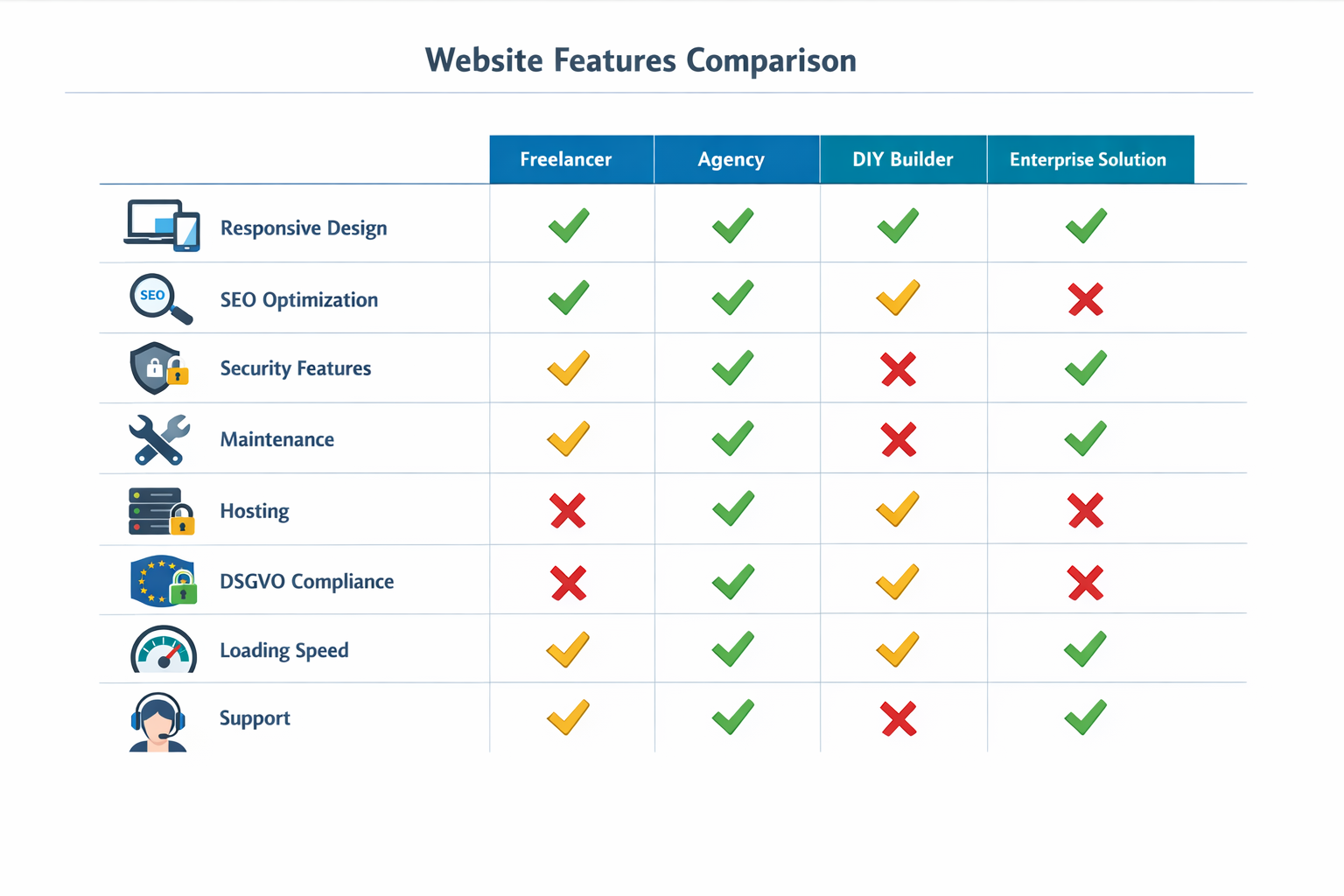
Freelancer (1,500 – 5,000 €)
- ✅ Cheapest option for small projects
- ✅ Direct communication, flexible
- ❌ Capacity limits, vacation replacement is missing
- ❌ Mostly generalist, not for all specialist topics
Agency (3,500 – 15,000+ €)
- ✅ Full team (design, development, SEO, content)
- ✅ Professional processes, reliable timelines
- ✅ Long-term care and support
- ❌ Higher price due to overhead
- ❌ Sometimes less personal
Online platforms with service (800 – 3,000 €)
- ✅ Fastest start, often template-based
- ✅ Fixed prices, transparent packages
- ❌ Limited customization
- ❌ Less strategic advice
Decision rule: Choose a freelancer for simple projects under €5,000, a Have your website professionally created at an agency for business-critical websites from €5,000, and platforms only for very standardized requirements.
How does the process work when you have a website created?
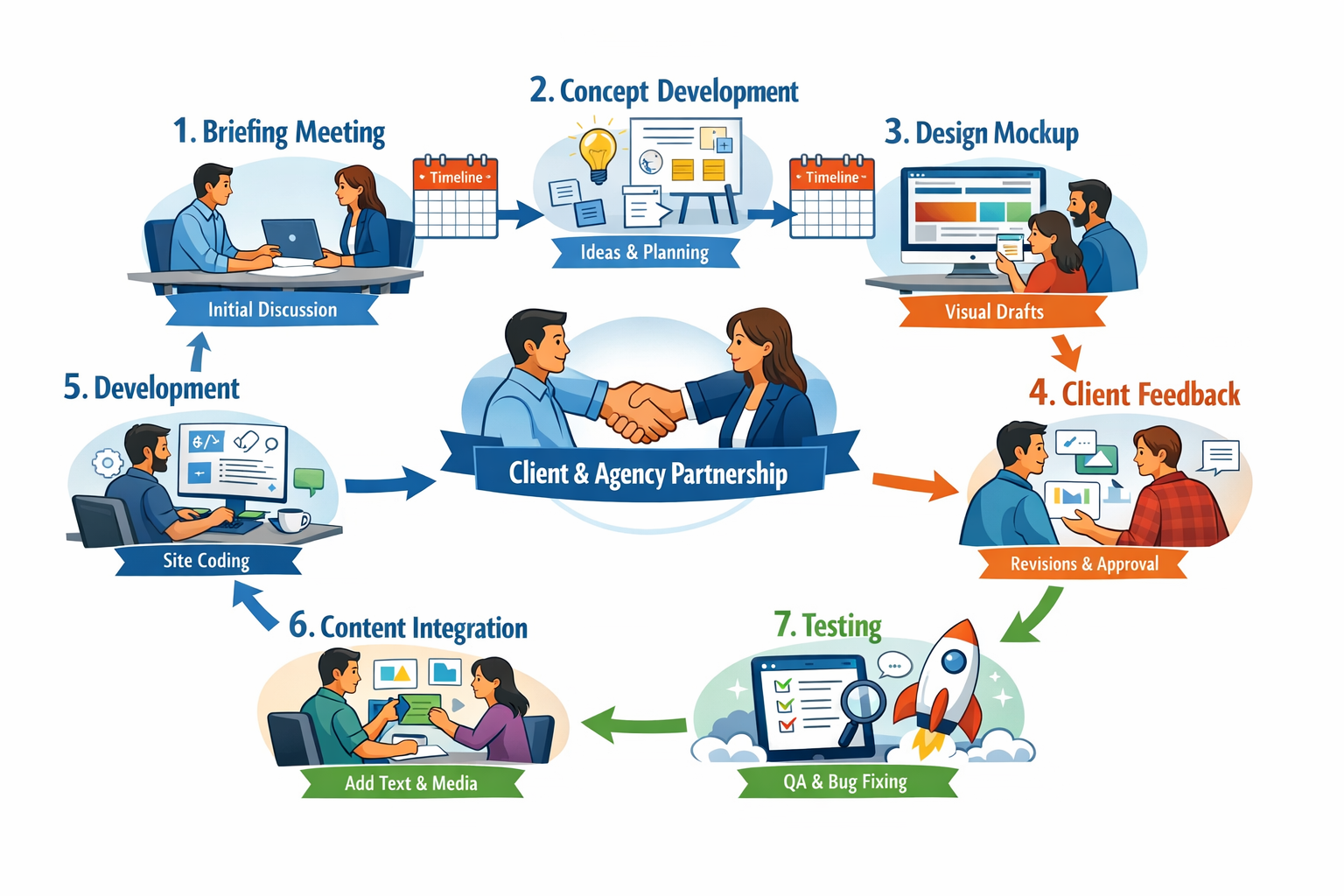
The typical process takes 6-8 weeks and follows a structured process from the first idea to launch. Professional providers work in clearly defined phases so that you always know where you stand.
The 8 phases of professional website creation
Phase 1: Briefing & Strategy (Week 1)
- Kickoff meeting: clarify goals, target group, competition
- Define functionality: What does the website have to be able to do?
- Set budget and timeline
- Your input: Brand material, competitor examples, desired features
Phase 2: Concept & Sitemap (Week 1-2)
- Develop page structure
- Plan user journeys
- Create wireframes (rough sketches of the page layouts)
- Your input: Feedback on structure and navigation
Phase 3: Design Draft (Week 2-3)
- Mood boards and color concepts
- 2-3 design variants for homepage
- Responsive design for mobile, tablet, desktop
- Your input: Design feedback, change requests (usually 2 correction loops included)
Phase 4: Design Finalization (Week 3-4)
- All subpages in the final design
- Set typography, buttons, icons
- Create a style guide
- Your input: Final release
Phase 5: Development (Weeks 4-6)
- Frontend programming (HTML, CSS, JavaScript)
- Backend integration (CMS like WordPress, Typo3, etc.)
- Add functions (forms, booking systems, etc.)
- Your input: Minimal – developers work independently
Phase 6: Content Integration (Week 5-6)
- Enter texts
- Optimize and upload images
- SEO basics: meta titles, descriptions, alt tags
- Your input: Deliver (or commission) texts, images, videos
Phase 7: Testing & Optimization (Week 6-7)
- Functional test on all devices
- Check browser compatibility
- Performance optimization (loading times)
- GDPR check, test accessibility
- Your input: Acceptance and final change requests
Phase 8: Launch & Handover (Week 7-8)
- Domain change or new registration
- Live connection
- Set up Google Analytics & Search Console
- Training for content maintenance
- Your input: Final approval, participation in training
Common delays and how to avoid them
Problem: Content comes too late
Solution: Prepare texts and images before the project starts or have them professionally created
Problem: Endless feedback loops
Solution: Establish clear decision-making processes internally, do not involve too many stakeholders
Problem: Additional requests during development
Solution: Document changes and plan them as a separate phase after launch
Pro tip: At a Have a WordPress website created The development time is often shortened because the CMS already includes many standard functions.
What functions should a modern website have in 2026?
Modern websites are active business tools, not passive brochures. The trend is clearly towards functionality: booking calendars, automated offers, CRM integrations and interactive elements replace static information pages[1].
Must-have features for every professional website
Technical basics:
- ✅ Responsive design – perfect display on all devices
- ✅ SSL encryption – HTTPS is standard and ranking factor
- ✅ Loading time under 3 seconds – otherwise 40% of visitors will drop out
- ✅ Mobile-first optimization – over 60% of access comes from smartphones
- ✅ GDPR compliance – Cookie banner, data protection, legal notice
SEO & Visibility:
- ✅ Search Engine Optimization – clean URL structure, meta tags, schema markup
- ✅ XML sitemap – so that Google can find all pages
- ✅ Google Analytics integration – to measure success
- ✅ Loading time optimization – compressed images, caching, CDN
Ease of use:
- ✅ Intuitive navigation – a maximum of 3 clicks for each piece of information
- ✅ Clear call-to-actions – Visitors always know what’s coming next
- ✅ Contact options – Form, telephone, chat clearly visible
- ✅ Accessibility – required by law for many industries
Game-changer features for 2026
Interactive elements that convert:
Booking systems & appointment calendars
- Direct online appointment booking (for doctors, consultants, service providers)
- Automatic calendar synchronization
- Reminder emails
- To use: 30-50% more bookings through convenience
Live chat & chatbots
- Immediate answers to standard questions
- Qualification of leads
- 24/7 availability
- To use: 20-35% higher conversion rate
Automated offer creation
- Configurators for products/services
- Instant price calculations
- PDF export for customers
- To use: Sales process shortened by 40-60%
CRM integration
- Automatic lead capture
- Follow-up workflows
- Customer data managed centrally
- To use: No more manual data entry
Marketing automation
- Newsletter registration with welcome series
- Remarketing pixels for ads
- A/B testing for landing pages
- To use: Higher customer loyalty, measurable ROI increase
Industry-specific features
For eCommerce:
- Product catalogs with filter functions
- Shopping cart and checkout
- Payment integration (PayPal, Stripe, Klarna)
- Shipping cost calculator
- → Better get one now Have an online shop created
For service providers:
- Portfolio/References Showcase
- Testimonials with rating function
- Price calculator
- Resource library (downloads, guides)
For local businesses:
- Google Maps integration
- Opening hours widget
- Location pages for multiple branches
- Local SEO optimization
For content creators:
- Blog with categories and tags
- Social media integration
- Newsletter system
- Comment function
Important: Not every website needs all the features. Choose features based on your business goals. A cluttered website confuses more than it helps.
Have a website created: Which provider is right for me?
Choosing the right partner depends on three factors: Project size, budget and desired level of support. There is no one-size-fits-all best option – just the best one for your specific situation.
Provider types in comparison
Freelance web designer
Ideal for:
- Small to medium-sized projects (up to €5,000)
- Startups with limited budgets
- Projects with clear scope definition
- When personal care is important
Advantages:
- Direct line to the maker
- Flexible way of working
- Often cheaper hourly rates (60-120 €/h)
- Fast decision-making processes
Disadvantages:
- Capacity limits for large projects
- Usually a specialist in 1-2 areas
- Risk of absence due to illness/vacation
- Less formal processes
Web design agencies
Ideal for:
- Business-critical websites
- Complex projects from €5,000
- If you want full service (design, development, SEO, content)
- Long-term partnerships
Advantages:
- Complete team of experts
- Professional processes and tools
- Reliable timelines
- Long-term care possible
- Legal certainty through contracts
Disadvantages:
- Higher costs (often 30-50% more expensive than freelancers)
- Sometimes less flexible
- Communication runs through project managers
Website builders with service
Ideal for:
- Very small budgets (under €2,000)
- Standardized requirements
- Fast launch is more important than individuality
- If you want to take care of yourself later
Advantages:
- Fixed prices, transparent packages
- Fastest start (often 2-3 weeks)
- Easy self-management afterwards
- Hosting included
Disadvantages:
- Template-based, limited individuality
- Less strategic advice
- Limited scalability
- Vendor lock-in
Decision matrix: How to find the right provider
| Your situation | Recommendation | Reason |
|---|---|---|
| Budget < €2,000, easy side | Construction kit with service | Price-performance optimal |
| Budget 2,000-5,000 €, individual wishes | Freelancer | Flexibility + personal support |
| Budget > €5,000, business critical | agency | Professional processing + full service |
| E-commerce/shop | Specialized shop agency | Complexity requires expertise |
| Local business | Local SEO agency | Industry knowledge is important |
What you should pay attention to when choosing
Portfolio & References
- Have you implemented similar projects?
- Are the websites still online and maintained?
- Do the designs look modern or outdated?
Technical competence
- What technologies do they use? (WordPress, Custom Code, etc.)
- How do you approach performance optimization?
- Do you know anything about SEO?
Communication & Process
- How quickly do they respond to inquiries?
- Are there clear process descriptions?
- Are milestones and timelines defined?
Price transparency
- Are all costs itemized?
- What is included in the price and what costs extra?
- Are there hidden follow-up costs?
Support after launch
- Do they offer maintenance contracts?
- How quickly do they react to problems?
- Do they train you for content curation?
Legal
- Are there written contracts?
- Are usage rights clearly regulated?
- Who owns the code/design?
Pro tip: Always request 2-3 offers and compare not only the price, but also the scope of services and chemistry. A cheap offer that later ends in chaos is more expensive than a fair price with professional handling.
Avoid common mistakes when creating a website
The biggest mistake is starting blindly without clear goals. Many companies commission a website because “you just need it” – and then wonder why it doesn’t bring any results.
The 7 most expensive mistakes and how to avoid them
Mistake 1: No clear goals defined
The problem: You say “I need a website” instead of “I want to generate 20 requests per month.”
The result: The website looks nice, but doesn't produce measurable results.
Here's how to do it correctly:
- Define concrete KPIs before the start of the project: inquiries, sales, newsletter registrations
- Determine what Success means to you
- Tarpaulin Tracking right from the start (Google Analytics, conversion tracking)
Mistake 2: Only create content after the launch
The problem: The website is ready, but texts and images are still missing - the launch has been delayed for weeks.
The result: Additional costs due to waiting times, momentum is lost.
Here's how to do it correctly:
- Have texts written or write it yourself before design starts
- Professional photos organize early
- Clear Content deadline arrange with agency
Mistake 3: Too many cooks spoil the broth
The problem: Managing directors, marketing, sales – everyone wants to have a say and has different opinions.
The result: Endless feedback loops, watered down design, skyrocketing costs.
Here's how to do it correctly:
- A person Define as the main contact person
- Internal feedback collect and consolidate
- Maximum 2 correction loops agree
Mistake 4: Mobile is forgotten
The problem: The website looks great on the desktop, but is unusable on the smartphone.
The result: 60%+ of your visitors have a bad experience and bounce.
Here's how to do it correctly:
- Mobile-first Demand design
- Every draft real devices test, not just in the browser
- Navigation and buttons big enough for thumb
Mistake 5: SEO as an afterthought
The problem: The website goes live, then “SEO should be added quickly.”
The result: Basic structural errors can no longer be corrected and rankings are not achieved.
Here's how to do it correctly:
- SEO from the start plan
- Keyword research before Content creation
- Technical SEO (URL structure, meta tags, schema) while Development
- Possibly one SEO audit for websites after launch
Mistake 6: Cheapest provider wins
The problem: You choose the cheapest offer without checking references.
The result: Poor quality, canceled projects, ultimately more expensive than a fair price.
Here's how to do it correctly:
- Price-performance evaluate, not just price
- References call and ask
- Distrust dumping prices (under €1,000 for business website)
Error 7: No maintenance scheduled
The problem: Website goes live, then no one cares about it anymore.
The result: Security holes, outdated plugins, poor performance, loss of rankings.
Here's how to do it correctly:
- Maintenance contract complete (50-200 €/month)
- Regular Updates ensure
- Backups automate
- Create and maintain website from a single source
FAQ: The most important questions about having a website created
How long does it take to get a website created?
A professional business website typically takes 4-8 weeks from briefing to launch. Simple websites can be ready in 2-3 weeks, complex projects with a shop or special functions take 3-6 months.
How much does a professional website cost in 2026?
The costs range between 1,500 euros for simple websites and 15,000+ euros for complex business solutions. The average for a solid company website is 3,500-6,000 euros including design, development and basic SEO.
Do I need technical knowledge when I create a website?
No, that's exactly the advantage. You provide content and feedback, the professionals take care of all technical aspects. After the launch, you will receive training on simple content maintenance - anyone can do this without any prior knowledge.
Can I maintain my website myself later?
Yes, with modern CMS solutions like WordPress you can easily change texts, images and blog posts yourself. However, technical updates and security should be taken care of by professionals - there are maintenance contracts starting at 50 euros per month.
Do I own the website once it's created?
That depends on the contract. With reputable providers, all content, design and code are yours after full payment. Be sure to clarify usage rights in writing before signing the contract.
Is WordPress the best choice for my website?
WordPress is suitable for 80% of all business websites: flexible, SEO-friendly, large community, thousands of plugins. There are alternatives for very specific requirements or extremely high performance demands, but WordPress is ideal for most.
How do I find the right provider?
Check portfolio and references, request 2-3 offers, pay attention to clear processes and communication. Call previous customers and ask about their experiences. Don't choose the cheapest one, choose the one with the best price-performance ratio.
What happens if I don't like the design?
Reputable providers plan 2-3 correction cycles. Important: Give specific feedback instead of “I don’t like it”. After agreed correction loops, further changes cost extra - this is fair and motivates focused feedback.
Do I need a maintenance contract?
Yes, absolutely. Websites need regular updates (security, plugins, WordPress core), backups and performance checks. A maintenance contract costs 50-200 euros per month and prevents expensive emergency repairs or hacks.
How quickly will my new website rank on Google?
You will see the first rankings after 2-4 weeks, good positions take 3-6 months with continuous SEO work. A technically clean website is the basis, but content and backlinks take time to work.
Can I keep my old website and just have it revised?
Relaunching is often cheaper than building new. However, if the technology is outdated (over 5 years old), a restart usually makes more sense - patching old systems ends up costing more than setting up a new one.
What is the difference between website and homepage?
Homepage is the homepage, website is the entire online presence with all subpages. Colloquially, the terms are often used synonymously, but technically the homepage is just one page of the website.
Key Takeaways: The most important thing to have a website created
- Professional website creation costs 1,500-15,000 euros and lasts 4-8 weeks - an investment that pays off through time savings, better quality and measurable results
- Modern websites are active business tools with booking systems, automation and CRM integrations instead of passive information brochures[1]
- The choice between freelancer, agency or platform depends on the budget, project size and desired level of support - it is not the cheapest price that counts, but the best price-performance ratio
- Content preparation is crucial for a punctual launch – texts and images should be ready or commissioned before the project starts
- SEO must be considered from the start, not added later - incorporate URL structure, meta tags and technical optimization during development
- Mobile-first will be standard in 2026, not optional – over 60% of visitors come from smartphones
- GDPR compliance and accessibility are a legal requirement, no extras - plan cookie banners, data protection and accessibility from the start
- Maintenance is not an option, but a necessity – Regular updates, backups and security checks prevent expensive failures and hacks
- Define clear goals before the project starts – “I want 20 requests per month” instead of “I need a website”
- One contact person on the customer side prevents endless feedback loops and keeps costs under control
Conclusion: Your next steps to a professional website
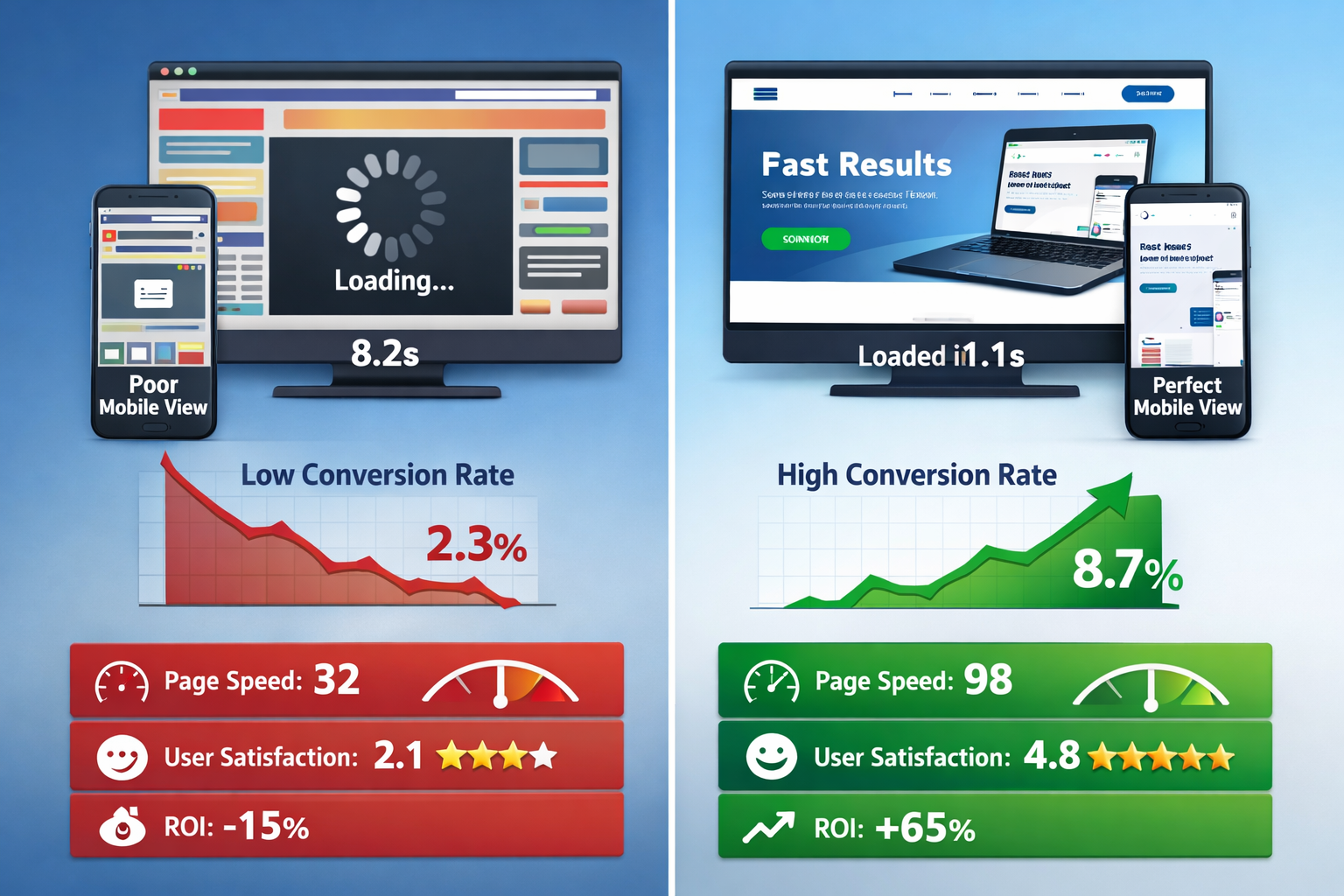
In 2026, having a website created will no longer be a luxury decision, but rather a strategic investment in your business. The good news: The market is ripe, the processes are professional, and you have a choice of providers to suit every budget.
Start with these concrete steps:
-
Define your goals – What should the website achieve? More inquiries, online sales, brand building? Write down 3-5 specific KPIs.
-
Set your budget – Be realistic: A business website that is intended to generate sales costs 3,500-8,000 euros. Don't save at the wrong end.
-
Gather inspiration – Screenshot websites you like. Write down what you like about it (design, features, structure).
-
Prepare content – Write texts or hire a copywriter. Organize professional photos. This saves weeks later.
-
Get 2-3 offers – Compare not only price, but also scope of services, process and references.
-
Actively check references – Call previous customers. Ask about experience, reliability, results.
-
Plan launch marketing – The best website is useless if no one knows about it. Plan a budget for SEO, ads or social media.
The most common question at the end: When is the best time to have a website created?
The answer: Now. Every month of delay is lost business. Your competition never sleeps, and Google takes months to rank new websites. The sooner you start, the faster you will see results.
Important: A website is never “finished”. It evolves with your business. Plan for continuous optimization right from the start – new content, A/B testing, SEO improvements. The best websites grow with their businesses.
Not sure where to start? Contact 2-3 agencies for a non-binding consultation. Reputable providers take the time to understand your situation and give initial recommendations - often free of charge. This helps you get a feel for the process and chemistry.
Your website is your most important employee – it works 24/7, never complains and gets better with every update. Invest wisely, choose the right partner, and you will benefit for years to come.
References
[1] Web design 2026 What we learned in 2025 and which trends determine modern websites – https://www.organica.agency/de/magazin/webdesign-2026-was-wir-2025-gelernt-haben-und-welche-trends-moderne-webseiten-determinen/
[2] Web design tips trends – https://www.fuer-gruender.de/wissen/unternehmen-gruenden/website-erstellen/webdesign-tipps-trends/
KI-Offenlegung: HINWEIS: Bilder wurden mit KI erstellt oder bearbeitet und sind keine realen Abbildungen. Teile der Texte wurden mit Hilfe von KI erstellt und redaktionell von einem Mensch bearbeitet.